Showing posts with label Slimline Card Builder. Show all posts

Tuesday Tutorial - Christmas Cheer!

 Hello everyone...

Does anyone out there actually know what day it is? - I don't have a clue but I'm just going with it! (:

Today I have a fab project to show you!  This was definitely great fun to do!

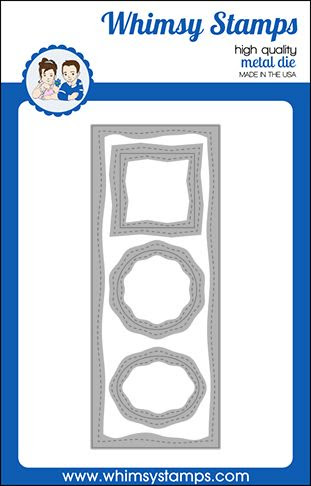
I thought the that the Slimline Card Builder Die from Whimsy Stamps was perfect to be made into a bottle gift tag!  Here's a quick tutorial for you so you can see how I did it!
I dabbed some dots of watercolour ink onto my work surface...
...and sprayed them with water.
Then a pressed a piece of watercolour card face down on the ink and after a few seconds lifted it up.  I left it to dry naturally but you can use a heat tool to speed up the process if you want to!
I then stamped the dragon from the Dragon New Year set onto card, coloured it with Copic markers and cut it out.
I used the Slimline Card Builder Die Set to cut out the inky card as shown...
...and stamped and die cut the sentiment and bunting.  Finally I fixed everything to the die cut tag!
CHEERS!

Thank you for popping by

Happy Crafting from Sue...xxx

Slimline Card Builder Die - Whimsy Stamps **NEW Dragon New Year Clear Stamps - Whimsy Stamps 

**NEW Alphabet Mini Clear Stamps - Whimsy Stamps

Slimline Bunting Borders Die Set - Whimsy Stamps Quick Strips Die Set - Whimsy Stamps


31 Nights of Halloween - Night 1


Good evening, my intrepid friends!  Are you ready for a frightfully fun month of Halloween inspiration and $300 in prizes?!  It's Andrea with you tonight, and I'm delighted to be kicking off Whimsy's annual 31 Nights of Halloween with a fun, interactive card featuring the Halloween Scream stamp set.


Now, personally, I don't like zombies.  I can't stand their appearance or the horrible sounds they make, not to mention the idea of being eaten by one is downright terrifying.  However, there's something about these images from Halloween Scream that tickle my funny bone.  Maybe it's how gleeful the zombie looks or how terrified the mummy is.  I don't know.


Usually, I start with my images, but for this card, I created the background first to allow the inks time to dry.  For the sky, I blended with the following colors of Distress Oxides: Mermaid Lagoon, Chipped Sapphire, and Black Soot.  I blended a separate panel of white cardstock with Mowed Lawn, Peeled Paint, and Black Soot for the grass.  I splattered white paint over the sky and set both panels aside to dry while I colored my images.


After stamping the mummy, zombie, and tombstone from Halloween Scream, I colored them with Copics.  I used my ScanNCut to cut out the images and then my scissors to cut out some interior places the machine didn't.  Then it was time for the fun part - creating the interactive element.


I die-cut the sky with the Slimline Card Builder Dies and created the slot for the slider with the Kinetic Straight Basics Dies.  I used the partial die-cutting technique and the Grass & Cloud Edger Dies to get the grass the right length before trimming it with the Slimline Card Builder Dies.  From that same green panel, I die-cut the pull-tab and two circles with the No-See Straight Basics Dies.  Finally, I die-cut the scored tab from the No-See Straight Basics Dies from white cardstock.


With all of my pieces cut out, it was time to assemble the card.  Using liquid adhesive, I adhered a plastic slider disc to one of the circles, attached the pull-tab around the disc, and placed the pull-tab behind my background.  I placed a bit of glue on the pull-tab and attached the coordinating end of the white tab, slipping the disc through the hole in the tab.  Next, I adhered the other circle to the top of the disc.  I placed a layer of foam tape on the back of my panel, making sure not to impede the movement of the slider, and attached it to a white card.  


I placed a layer of foam tape on the back of the grass panel, again making sure not to impede the movement of the slider, and adhered it to my background.  I scored the white tab along two of the score marks, trimmed off the excess, and adhered my mummy to the tab.  I attached the tombstone, placing a bit of foam tape behind the part sticking above the grass, and adhered the mummy with more foam tape.  I die-cut white cardstock with the Quick Strips Dies, stamped a sentiment from Halloween Scream, and popped it up onto my card with dimensional adhesive.  I stamped "pull" from the Halloween Postage set onto the pull-tab and white heat-embossed a second sentiment from Halloween Scream on the background.

Whew!  We made it to the end, and I hope it wasn't too confusing.  

In case you missed it, be sure to check out last night's blog post for all of the prize info and how to enter to win.

Have a great night!



Tuesday Tutorial- Haunted House Portrait

 Hey there friends!  Katie here today with a fun tutorial for you that is mostly die cutting! Here is what we will be making today: 


Let's start with our supplies, you will need:
Cardstock- Black, Color of your Choice, Kraft, White (Copic Friendly)
Other- Versamark Ink, Gold Embossing Powder, Copics (E51, E53, R14), White Pencil, Gold Thread, Snips, Glue and Foam Tape


First, Start with your base cardstock.  It should be the colored layer and measure 4.25 X 5.5 (I mount mine on white to use less colored cardstock).  Next, cut your black cardstock to 4 X 5.25.  Die cut the Black portion using the Comic Burst Die and poke out all the bits.  Then take a bit of whatever DP you like for the background and use the same die to cut out the middle.  Adhere these layers together with the DP in the center, then the black and the color behind.  You should see the color through the Comic Burst cut outs. 


Set this aside and work on the frame.  First take your small bit of Kraft paper and die cut out the oval from the Slimline Card Builder set. Cut out the middle and trace around the outside of the die with a pencil.  Then remove the die and cut out the traced portion.  


Next, you will smush versamark around the frame.  Dump some gold embossing powder on and heat it.  YOu can use a different color from gold if you prefer, I used this to make an antiqued frame.  It doesn't have to be perfect either, because that creates the antique look if you have gaps.  Then cut out a small portion of DP and use this die again.  The center portion becomes the background of your frame. 


Next, you are going to work on Elvira.  Use the die and cut her out twice, once in black and once in white (Copic Friendly).  Color the face with your skin toned Copics and the eyes with red (or another color if you prefer).  On the black portion, use your white pencil to add white to her hair. 


Next, put her together inside your frame and cut off any excess of her gown.  Then you can place foam on the back side which will hold the center to the frame and hold down the gold thread that you will use to "hang" your frame.  


Mount this onto the center of your card.  Then mount it on your white base and you are done.  You can add sentiments or other embellishments but I feel like it is pretty perfect as is. 


This is a pretty easy card to replicate with mostly die cutting, so if you like to send out a lot of Spooky cards for Halloween, this is perfect. 

Thanks for visiting, I hope you enjoyed this post. 


Tuesday Tutorial - Creating Soft Backgrounds with Dies

Hey there! Tricia here with you today, I am sharing with you today how to create a soft background for a Slimline card.   I created a homemade stencil using the Primitive Shaker die.  


First, I started by using some Post It Note Tape to create my grassy area.   I lightly inked an area with Twisted Citron ink.   


Next, I created a stencil with vellum cardstock and the Primitive Shaker Die set.  I move the vellum around to add soft pink hearts across the Slimline Card Builder panel using Spun Sugar Distress Oxide ink.  Using vellum allows you to see underneath when placing the hearts randomly around the panel. 


Next, I colored my stamped images from Crittercorns with my Copic Markers: 

W8, W6, W5, YG17, YG03, YG01
 RV25, RV13, RV09,
 YR04, YR09, Y11, Y18, BG11, BG53,
 RV10, RV00, E40, E41, E42, E43

I stamped a sentiment from Hello Bear and stacked them on top of one another.  I added my images to the panel with some foam tape.   I added some final details with a white gel pen.  I layered the panel onto a kraft card base.   


Take a look at your dies and see what you can use to create a stencil!   Thanks for stopping by!